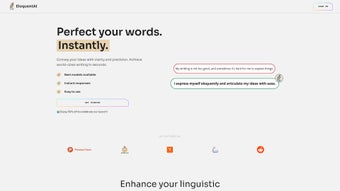

Download EloquentAI – AI Writing Assistant for Business Communication
Overview
In today’s fast‑paced market, clear and persuasive communication can be the difference between a closed deal and a missed opportunity. EloquentAI steps into that gap as an AI‑powered writing assistant that is purpose‑built for businesses of every size. Leveraging cutting‑edge Natural Language Processing (NLP) and Machine Learning (ML) models, the platform automatically crafts, refines, and analyzes text across a spectrum of customer‑facing channels.
Whether you need a quick email reply, a polished proposal, or a responsive chatbot script, EloquentAI delivers coherent, context‑aware language that mirrors a human tone while staying on brand. Beyond text generation, the tool incorporates sentiment analysis and structured data processing, turning raw customer interactions into actionable insights. This means you can not only respond faster but also understand emerging trends, pain points, and opportunities hidden within your communications.
The interface is intentionally designed for users with minimal technical expertise—drag‑and‑drop templates, a live preview pane, and guided prompts keep the learning curve shallow. At the same time, the platform offers deep integration capabilities through RESTful APIs and webhooks, allowing seamless connection to existing CRM, help‑desk, or marketing automation suites. In short, EloquentAI promises to boost engagement, reduce response times, and empower data‑driven decision‑making—all while keeping the user experience simple and secure.
Key Features & Benefits
- AI‑Generated Business Writing: Instantly produce professional emails, proposals, reports, and social media posts that adapt to your company’s voice.
- Smart Chatbot Builder: Create conversational agents that understand intent, handle multi‑turn dialogs, and provide accurate answers without extensive coding.
- Sentiment & Emotion Analysis: Detect positive, neutral, or negative tones in real‑time, enabling proactive customer service and reputation management.
- Structured & Unstructured Data Processing: Transform raw chat logs, survey responses, and support tickets into clean datasets for analytics.
- Seamless System Integration: REST API, webhooks, and native plugins for Salesforce, HubSpot, Zendesk, and Microsoft Teams.
- Customizable Templates & Brand Guidelines: Store brand‑specific terminology, style guides, and approved phrasing to ensure consistency.
- Collaboration Workspace: Multiple users can co‑author, comment, and approve content within a secure, role‑based environment.
- Continuous Learning Loop: The model fine‑tunes itself based on user feedback, improving relevance and accuracy over time.
- Enterprise‑Grade Security: End‑to‑end encryption, GDPR compliance, and optional on‑premise deployment for sensitive industries.
- Analytics Dashboard: Real‑time KPIs such as response time, sentiment shift, and engagement rates displayed in an intuitive UI.
Each of these capabilities is built to solve a specific business pain point. For example, the AI‑Generated Business Writing feature eliminates the need for a dedicated copywriter for routine communications, cutting costs while preserving quality. The Sentiment Analysis engine gives support teams a heads‑up on angry customers before a complaint escalates, allowing proactive outreach. Moreover, the integration layer means you can embed EloquentAI directly into your existing ticketing workflow, turning every incoming request into a data point for strategic planning. Collectively, these functions not only streamline daily operations but also lay a foundation for long‑term growth through data‑driven insights.
Installation & System Compatibility
Step‑by‑Step Installation Guide
Getting started with EloquentAI is designed to be a frictionless experience. First, visit the official website and click the “Download for Windows / macOS / Linux” button that matches your environment. The installer is a compact, signed executable (.exe for Windows, .dmg for macOS, and .AppImage for Linux) that automatically checks system prerequisites before proceeding.
Once launched, the wizard walks you through license acceptance, destination folder selection, and optional desktop shortcut creation. After installation, launch the application and log in with your corporate credentials or sign up for a free trial using an email address. For cloud‑only deployments, simply navigate to app.eloquentai.com, where the web client runs in any modern browser (Chrome, Edge, Firefox, Safari).
No additional downloads are required, and all updates are applied server‑side, guaranteeing you always have the latest AI models and security patches.
Operating System & Hardware Requirements
EloquentAI supports the major desktop operating systems:
- Windows 10, 11 (64‑bit) – Minimum 4 GB RAM, 2 GHz dual‑core processor.
- macOS 12 Monterey and later – Minimum 4 GB RAM, Apple Silicon or Intel 64‑bit.
- Linux distributions with kernel 5.4+ – Recommended Ubuntu 20.04 LTS or Fedora 34.
- Mobile access via native apps for Android 12+ and iOS 14+ (download from Google Play or App Store).
After the initial setup, a quick “wizard” walk‑through helps you configure API keys, select default language models, and import existing brand guidelines. The platform also offers a library of pre‑built connectors; simply drag the desired connector (e.g., Salesforce, HubSpot) onto the workflow canvas, enter authentication details, and you’re ready to sync. Because the system auto‑detects network proxies and corporate firewalls, most enterprises can adopt EloquentAI without involving the IT department for extensive configuration.
Pros and Cons
Pros
- Highly accurate NLP models that produce human‑like, context‑aware text.
- All‑in‑one solution: writing assistance, chatbot creation, sentiment analysis, and analytics.
- Intuitive drag‑and‑drop interface reduces the learning curve for non‑technical users.
- Robust integration options with major CRMs, help‑desks, and marketing platforms.
- Enterprise‑grade security and compliance features.
- Continuous model improvement based on user feedback.
- Free tier available for small teams and trial periods.
Cons
- Advanced customization (deep model fine‑tuning) requires a premium subscription.
- On‑premise deployment can be resource‑intensive for smaller IT departments.
- While the UI is user‑friendly, power users may miss a full‑code SDK for complex workflows.
- Initial pricing may be higher than basic grammar‑checking tools.
- Internet connectivity is required for cloud features, limiting usage in restricted environments.
Overall Verdict: EloquentAI stands out as a versatile, secure, and intelligent assistant for business communication. Its blend of AI‑driven content creation and deep analytics makes it a compelling investment for organizations looking to modernize their customer engagement and internal documentation processes.
FAQ & Final Thoughts
Is there a free version of EloquentAI?
Yes, EloquentAI offers a free tier that includes up to 5,000 generated words per month, basic sentiment analysis, and access to a limited set of templates. It’s ideal for freelancers or small teams testing the platform.
Can EloquentAI be integrated with my existing CRM?
Absolutely. Native connectors are available for Salesforce, HubSpot, Zoho CRM, and Microsoft Dynamics. For other systems, the REST API and webhooks enable custom integration in minutes.
How does EloquentAI ensure data privacy?
All data is encrypted in transit using TLS 1.3 and at rest with AES‑256. The platform is GDPR and CCPA compliant, and on‑premise deployments keep data behind your firewall for highly regulated industries.
What kind of support is available for enterprise customers?
Enterprise plans include 24/7 priority support, a dedicated account manager, and access to a private Slack channel for rapid issue resolution. On‑boarding assistance and custom training sessions are also part of the package.
Can I customize the AI’s tone to match my brand voice?
Yes. The Brand Guidelines module lets you upload style guides, preferred terminology, and example texts. The AI then aligns its output to these parameters, ensuring consistent messaging across all channels.
Ready to elevate your business communication? Download EloquentAI today and experience the power of AI‑driven writing, sentiment insights, and seamless integration—all wrapped in a secure, user‑friendly package. Whether you’re a startup seeking a competitive edge or an enterprise aiming to unify brand voice, EloquentAI offers a scalable solution that grows with your needs. Click the “Download” button above, start your free trial, and let the conversation begin.



.png)



